
What a relief.
I quit Facebook last Sunday. Well, not really. ‘Deactivated my account’ is the more accurate description. As you know, there’s no quitting Facebook. It’s like Hotel California, “you can check-out anytime you like but you can never leave”. Everything you upload to Facebook stays in Facebook — as with everything you upload online.
Leaving Facebook was a decision I’ve been mulling over the last few months but never really gotten around doing because I have two apps (pages) that I hold dear to me and Facebook wouldn’t let me ‘deactivate’ my account unless I turnover its ownership or delete it altogether.
But as fate would have it, what I couldn’t force myself doing on normal circumstances, I’d eventually do abruptly in dire situations.
Curiously, after I announced my intention to leave Facebook last Saturday and failed, I was greeted with an unusual online security issue (at least for me) the morning after, while waiting in line at an Eye Center for my follow-up check-up.
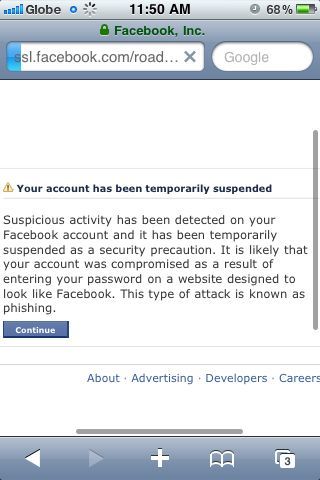
As with other security issues, it has a way of hitting you at the worst timing. I could swear it felt like the darn building is signal-shielded. There was no 3G, hardly even GPRS. And more than anything, I think that was what made the whole 4-hour ordeal almost unbearable.
There I was feeling small and powerless, even with an iPhone on a data plan, unable to recover my Facebook account through no fault of my own.
I wouldn’t have realized that I was in fact already a Phishing victim had I not decided to casually touch the Facebook icon on my phone after hours of waiting in the hospital. These are the days when I am thankful for ‘force of habit’.
Anyway, I eventually recovered my account when I got home and this post is intended to give you tips on how to avoid Phishing attacks and what to do in case the inevitable happens to you. You know what they say, what goes around comes around. So better to be safe than sorry.
How to avoid Phishing attacks:
1. Upon login at your Facebook account, always ensure that the “Keep me logged-in” option box under the “Email” field is unchecked, especially if you’re using a public computer or any shared device.
2. Never enter your Facebook log-in credentials in other websites. Some websites created for ‘phishing’ imitate legitimate websites and trick people into logging-in only to steal their credentials. Check the browser address / URL field and see if the string of characters ends in Facebook.com (ie., http://ssl.Facebook.com –> domain name must always be Facebook.com). If the website address looks something like http://Facebook.gotchaa.com, be wary of accessing it. The term ‘Facebook’ when used as ‘subdomain’ may be dubious (but not always). Make sure that you trust the website completely before proceeding especially if you were taken to that page via an unidentified link.
3. Never share your password. This is a no-brainer.
4. Always check what specific devices are linked to your Facebook account (where you logged-in to access Facebook) by regularly visiting the Accounts/Linked Accounts settings/option at the upper right-hand corner of your Facebook screen.
Facebook has recently increased account security by requiring users to register devices that they use to log-in to their account. This may be done every single time you log in or you may ask Facebook to recognize a specific device as legitimate by ticking a box that says “Don’t ask me again from this device”.
All your log-in activities in all devices used will be recorded at the “Accounts/Linked accounts” section. If you see a device you don’t recognize, it’s best to remove it from the list of authorized devices.
If you eventually become a ‘phishing’ attack victim, here are the steps to follow to recover your account (and possibly deactivate it for good):
1. There are 4 Steps to Reinstating a Suspended Facebook account caused by Phishing:
a. Security check – Facebook needs to ensure that you’re not a bot by asking you to answer the regular 2 words-captcha.
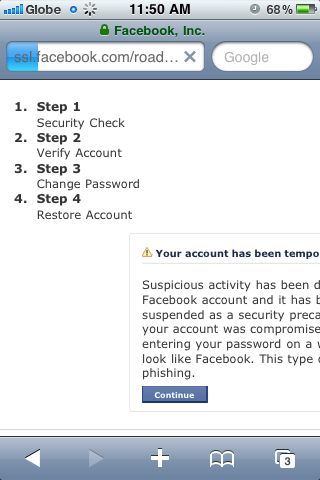
b. Then, Facebook needs to verify your identity by either of two methods:
1) Asking you to answer a “Security Question” which you elected (in case you did previously). Remember that your answer must “exactly match” what they have in their file or you’ll waste your time doing this verification procedure.
(What happened to me was worse because I was being asked a security question that I don’t even recall creating/choosing. Naturally, it would be dumb to guess since the answer may be randomly-generated unintelligible string of characters. So I didn’t use this method.)
2) Accurately identifying a series of Facebook friends through their “tagged” photos. Now, this seems easy enough if a) You actually ‘know’ how each and every one of your Facebook friends ‘look like’ and ; 2) Your friends tag photos ‘sensibly’ and don’t engage in massive tagging of cartoon/scenery/text photos. Good luck if you have tag-crazy friends who upload photos of their pets and tag each and everyone of their friends as ‘their dog’. Don’t worry though, Facebook seems to be fully-aware of this phenomenon, hence it lets you skip at most 2 oddly-looking photos tagging the wall.
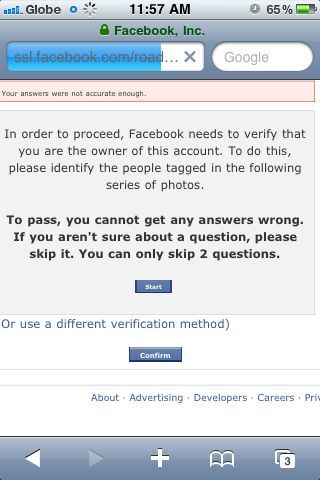
c. Change your password:
At this point, you’re prompted to change your password in order to take it away from limbo and back into your loving arms.
d. Facebook will now reactivate your account and you can now live your Facebook-driven life as before or see the light at the end of a tunnel as an awakening that wonderful and exciting as Facebook can be, it can also be a pain in the ass and a serious threat to your sanity.
And oh, I deleted my pages. Liberty at last.


Let me know what you think… :)